Video Sizes

Resources

Best practices for web

It’s important to optimize your videos for web, as it can quality and load speed of your site. Remember to follow the naming convention.

Recommendations

  • Limit to a max of 20 seconds

  • 720p

  • Aim for file size under 20Mb

  • Save as .mp4, .m4v, .mov

Banner background video

(ex. Homepage), the video will not display on tablet or mobile. A fallback static image will need to be added. Read Squarespace recos.


It’s important to optimize your images as it can effect how fast or slow your site loads and the images clarity. The goal is smallest files size possible without sacrificing quality. For better quality, avoid screenshots of video, if possible.

Squarespace automatically creates different size versions of every image. The height changes relative to the width to preserve the image's shape. Squarespace's built-in responsive design automatically chooses the appropriate image size based on the visitor's screen. Due to retina screens, images are usually saved at 2x the actual size displayed on the screen.


SAVING

If you’re using the latest version of Photoshop CC, be sure to use their new export dialog under File > Export > Export As…

That usually outputs better results than using File > Export > Save for Web (Legacy), and definitely better than using File > Save As…

Source: Foreground Web
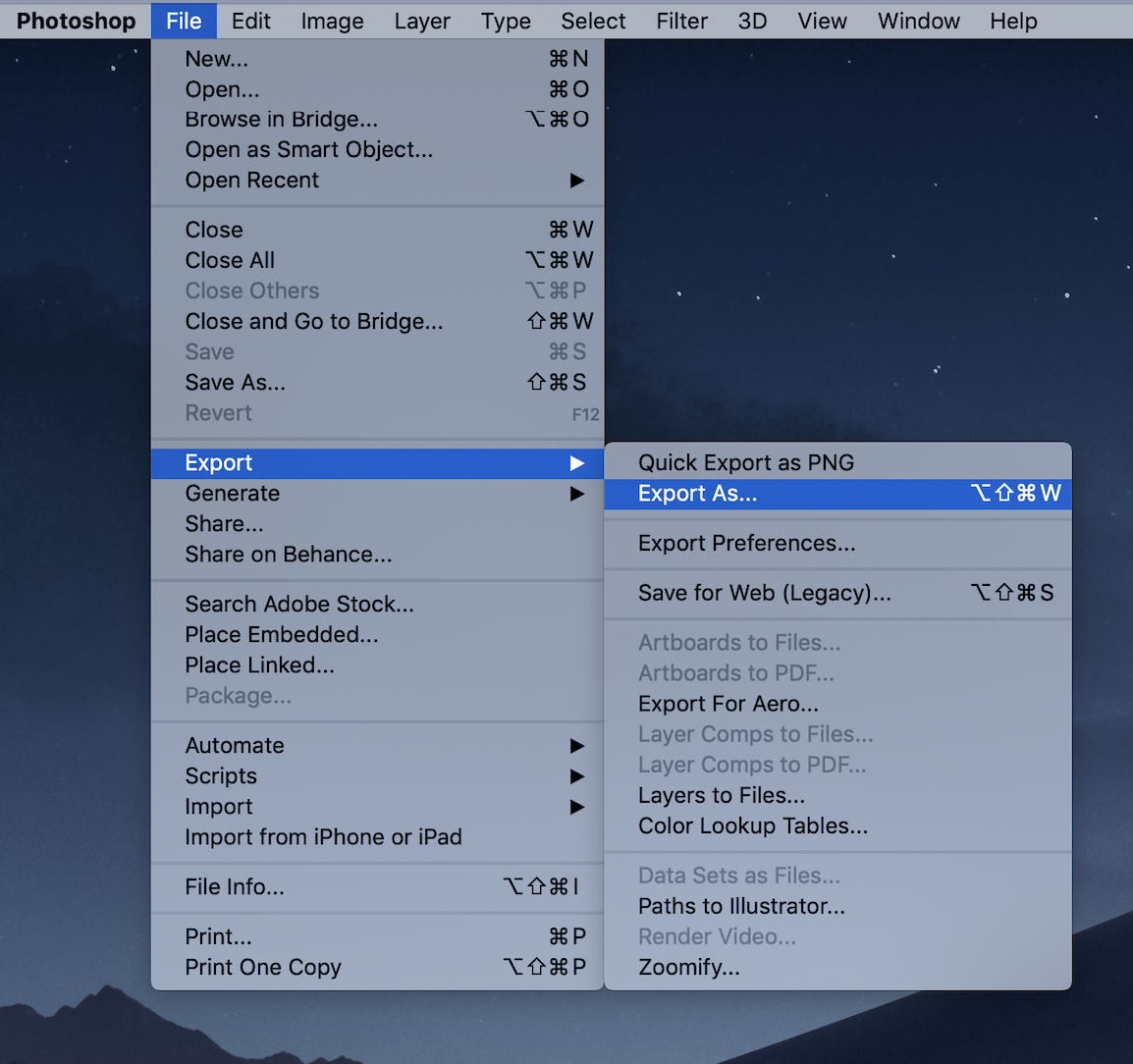
Save via “Export As”
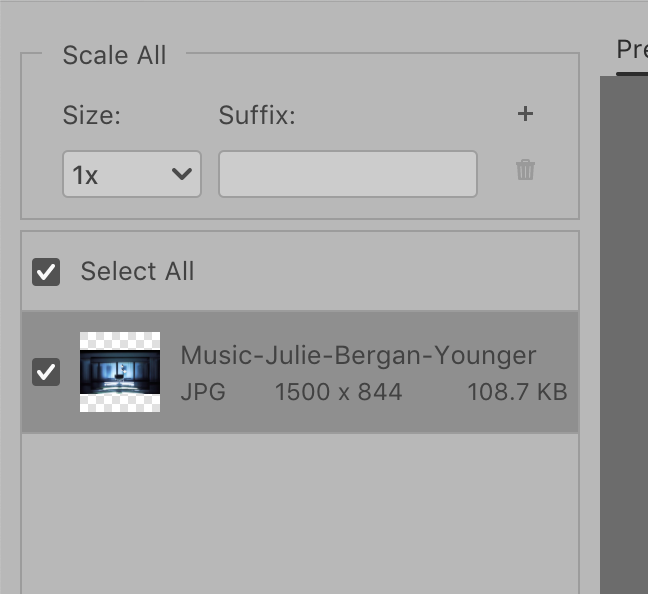

Recommendations

  • Aim for image file size under 200k (maximum size 1 Mb).

  • 50-70% quality (eyeball and adjust to the quality that is acceptable to you)

  • Use sRGB Color Space

  • Follow the naming convention!


full-screen images (banners, video fall-back images)

1500 -2500 pixels wide

Height should be cropped accordingly to how image will be used.

Currently, the only area this image occurs on the

  • About Page: Hero image (515px h)

  • About Page: city image (this is a free squarespace image - not sure if you want to use your own)

  • Video fall-back image (515px h)


Photography projects

1500-2000 pixels on the long edge


Thumbnails + POrtraits

1000-1500 pixels on the long edge

For future-proofing efficiency, crop images to 16:9 before saving.


Client logos

Use psd file provided.

300px x 300px Saved as a transparent .png

Focal POINT

Depending on a layout’s grid, aspect ratios may differ, so the image will become cropped to the focal point of the image (ex. in a thumbnail with aspect ratio of 1:1).

Focal point can be repositioned in Squarespace.
The Team


Erin Judd

Executive Producer  

Erin is the owner and Executive Creative Producer of No Frames, and CEO of the Helsinki based sister company No Frames Europe.

She has dedicated her career to establishing creative and effective production standards on a global scale. With an extensive background in commercial production and initiatives in original narrative content development, Erin has built an agile award-winning company that continues to grow amidst ever-changing demands and opportunities in production. She is passionate about the work, the team and her clients.


Mikko Timonen

Director/DP  

Mikko Timonen is a founding creative partner of No Frames and No Frames Europe. His award-winning work is seen across commercial campaigns, music videos and original narrative content.

Filming stories about the human experience and developing a distinct visual aesthetic for each project is what he feels most passionate about.


Jeff Brown

head of production  

Jeff Brown is a senior commercial producer at No Frames, managing the commercial division.

As a seasoned producer he has worked across LA, NY and almost every state in between. With meticulous attention to detail and a great sense of humor Jeff makes production "seemingly" effortless.

Image Blocks - Poster

CLIENT NAME

Multiple Campaigns

CLIENT NAME

“Campaign Title”

CLIENT

“Campaign Title Sed Amet Dolores”

This opens a traditional Squarespace Lightbox

Gallery Block of only images

Gallery Block of only videos

 Gallery Grid Block of Vid-Img-Vid

Gallery Block- Slideshow


Vid vs Img

Video caption

Poster Image

Links to page or site


Image types

Poster

Poster Image

testing. no lightbox.

Inline

Inline image test


Summary Block

DUPLICATING

WHAT can be duplicated

Only individual pages can be duplicated. When a page is duplicated, any code that it contains also gets duplicated.

WHat cannot be duplicated

  • Index Pages (sections can be duplicated though, because they are technically individual pages)

  • Blog Posts

  • Images

  • Gallery pages or blocks

CODE

ELEMENTS affected by CODE (FOund in Custom CSS and individual Pages > advanced)

  • Suppressing hyphenation

  • Background colors of sections on index pages

  • Blog post titles: smaller font

  • Blog: suppress default display items

  • Blog: styling for subnav

  • Image Block padding

  • Gallery of Client Logos: number of columns changes depending on device

  • Services text on Homepage and About: number of columns changes depending on device

  • Footer: background color, positioning across different sizes, font, and maintaining logo size.

  • Team sections: smaller profile images on mobile landscape, padding in general

  • Hover titles for different types of images: blog, gallery, image block

  • Subnav in Motion: assigning underline to the page

  • Accordion (Awards on Director pages): styling

  • Lightbox: text styling

JAVASCRIPT in SETTINGS > ADVANCED > CODE INJECTION 

  • Calls up email icon for the Team sections

  • Lightbox plug-in

  • Assigns underline to current Blog category/subnav

  • Allows control of Gallery’s thumbnail titles to have line breaks.